Norton
Norton Deepfake AI Protection
Designing an intelligent defence against AI-generated media across Windows, Mac, iOS, and Android.
Designing an intelligent defence against AI-generated media across Windows, Mac, iOS, and Android.
What if your device could instantly tell you whether a video call, voice message, or image is real, or an AI-generated deepfake? That question guided the design of Norton Deepfake AI Protection, a first-of-its-kind feature embedded within Norton’s Scam Protection suite. With the rapid rise of AI-generated media and deepfake scams, millions of people are exposed to manipulated content every day, from cloned voices in phone calls to synthetic faces on video platforms.
Norton needed to help users distinguish real from fake in an increasingly complex digital landscape. The result is a transparent, AI-powered system that scans media in real time, communicates detection results in plain language, and integrates seamlessly into the existing protection ecosystem, all while respecting user privacy and device performance.

Norton Deepfake Protection: Dashboard overview across Scam Protection modules
I led the product design of Deepfake Protection from the discovery phase to the final handoff. My responsibilities included shaping the user journey, designing interfaces, prototyping interactions, and aligning design language across Scam Protection modules. Collaboration with AI developers and cross-platform designers was crucial to ensure that the experience worked technically and visually across systems.
I also worked on integrating detection feedback into the broader Security History flow and alert system, ensuring that every scan result, whether automatic or manual, was logged, accessible, and consistent in tone and formatting.
Norton, part of Gen Digital Inc. (NASDAQ: GEN), is one of the world’s leading cybersecurity brands, trusted by over 500 million users across more than 150 countries. Gen Digital is a multi-billion-dollar global company headquartered in Tempe, Arizona, and Prague, with a portfolio that includes well-known brands like Avast, Avira, and LifeLock.
With annual revenues approaching $5 billion, the company is a Fortune 500 leader in consumer digital safety. Norton continues to evolve beyond traditional antivirus protection to deliver advanced, AI-powered solutions that safeguard people’s privacy, identity, and devices across all major platforms. Its mission is to empower every individual to live their digital life freely and securely, backed by over 30 years of innovation in cybersecurity.
In recent years, deepfake and AI-generated scams have rapidly increased, with global fraud losses from deepfake-related incidents exceeding $200 million in early 2025, and nearly half of businesses reporting exposure to AI-generated audio or video scams. This growing threat landscape made it critical for Norton to address manipulated media as part of its broader Scam Protection ecosystem.
Scam Protection already included several modules: Safe Web, Safe SMS, Safe Call, and Safe Email. Each feature served a specific purpose, but the addition of Deepfake Protection introduced a new layer of complexity. Unlike other forms of protection, deepfake detection relies on media analysis, AI inference, and device-level performance.
Real-time scanning demanded careful coordination with developers to represent system readiness, performance impact, and supported scenarios. The UI had to communicate these states in a clear and reassuring way without exposing unnecessary technical depth.
Each Scam Protection module had evolved independently. Aligning Deepfake Protection with the same visual and interaction framework required defining a shared structure for headers, tabs, states, and layouts.
Explaining AI behaviour in simple terms was a key goal. We used human-friendly labels like “AI content detected” instead of algorithmic jargon. Icons and illustrations further helped users connect abstract AI actions to familiar visual cues.
Introducing an AI-driven feature in a security product required striking the right balance between intelligence and privacy. We needed to reassure users that Norton’s AI was analysing safely and locally, without collecting or transmitting private data.
This project began as part of Norton’s broader initiative to expand its Scam Protection suite with AI-powered capabilities. Deepfake Protection was envisioned as a new kind of defence, one that could intelligently identify manipulated media in real time and present it in a way users could easily understand.
The goal was to translate advanced AI detection into a simple, trustworthy experience that aligns with Norton’s long-standing reputation for clarity and security. Every interaction needed to reinforce trust and make AI feel approachable rather than abstract or intrusive.
Clearly communicate what AI is analysing and when, making complex technology approachable and understandable for everyday users.
Fit seamlessly into Scam Protection’s visual and interaction patterns so users experience consistency across all protection modules.
Give users both reassurance and control over automated scanning preferences, including battery-saving behaviour and exclusion lists.
Consolidate older detection tools, like the YouTube deepfake plugin, into one unified experience that works across all platforms.
Since this was a completely new capability, the project began with a deep discovery phase involving AI engineers, product managers, and platform designers. We needed to understand the technical foundation: how and when AI models run, how much system performance they require, and what signals are available to visualise for users.
In parallel, we conducted a competitive analysis to benchmark how other cybersecurity products approached AI-related transparency and media protection. We reviewed products like Microsoft Defender SmartScreen, Kaspersky’s Safe Browsing, and various experimental browser extensions that attempted deepfake detection. Most relied on reactive warnings or browser pop-ups, which disrupted the user experience and provided little context about what was being analysed.
The new design should feel intelligent but effortless. Users should never have to decode what the AI is doing or wonder whether their privacy is at risk. Core design principle from the discovery phase
The team also analysed user feedback from the discontinued browser plugin, which focused on detecting deepfakes in YouTube content. Many users found the experience unclear or intrusive. That insight helped define a core principle: the new design should feel intelligent but effortless.
We also looked at behavioural data from existing Scam Protection features. These modules already established user expectations around scanning, alerts, and safety summaries. Deepfake Protection would need to speak the same visual and tonal language to feel cohesive within this trusted ecosystem.
The design process started with hand-drawn sketches exploring how Deepfake Protection could live within the Scam Protection dashboard. Some versions experimented with a standalone layout, while others integrated it directly alongside existing features.
We iterated through multiple wireframes to test where users expected scanning actions, summaries, and results to appear. Through early feedback and internal design critiques, we decided to align with the existing tab structure used by other Scam Protection modules.
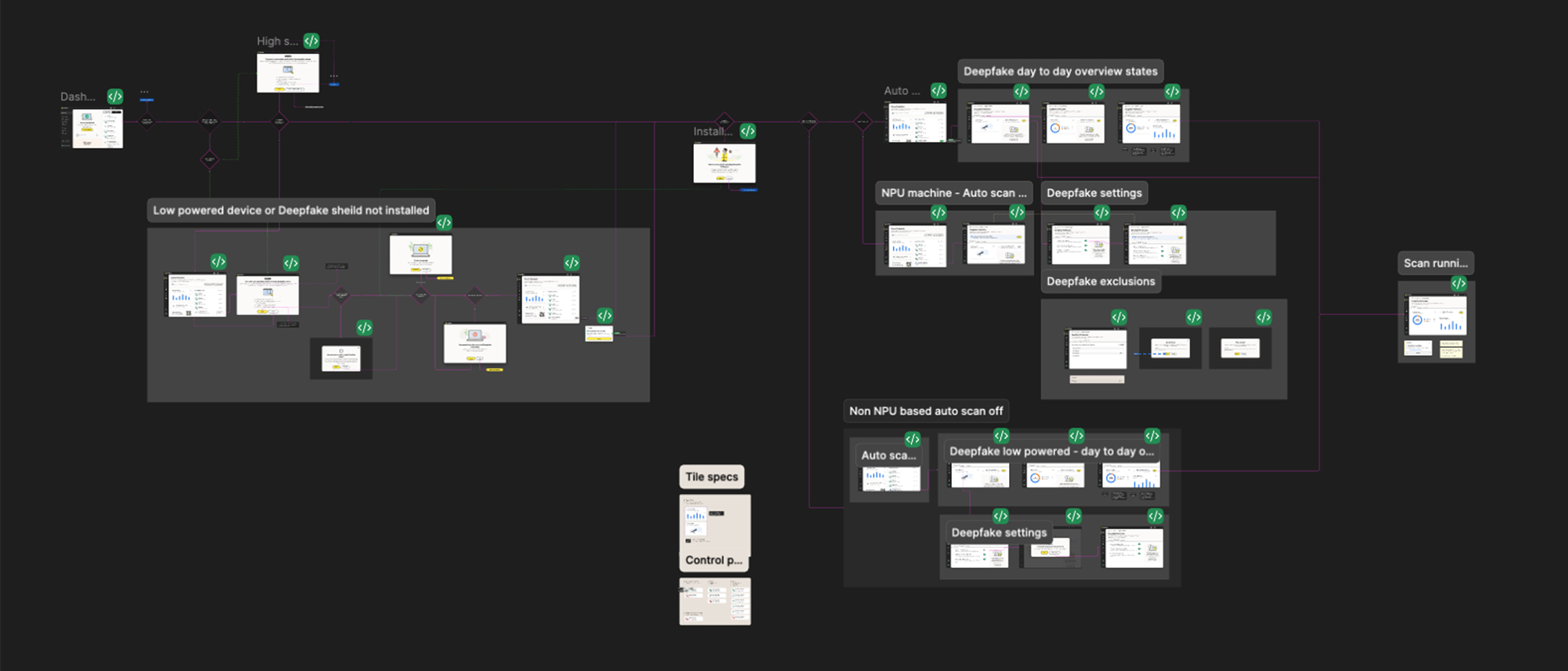
Early exploration: Scam Protection Windows experience wireframes and layout iterations
The design followed Jakob’s Law of Consistency so users could quickly transfer their familiarity from other protection features. We also applied Progressive Disclosure to present only essential information upfront, allowing users to expand for technical details when needed.
This balance of familiarity and clarity guided us from early sketches to final layouts that felt both innovative and harmonised with Norton’s established experience.
Deepfake detection is an invisible process. The AI analyses audio signals, compares patterns against trained models, and returns a confidence score - all within seconds. The challenge: none of this is visible to the user. Without deliberate design, the experience would feel like a black box - either nothing is happening, or a result appears with no context.
I mapped the AI pipeline into five user-facing states, each designed to communicate what the system is doing without exposing technical complexity:
Audio is being captured. A subtle animation signals the system is active without creating anxiety. The user knows protection is running.
The AI model is processing. We used calm, non-urgent feedback - a progress state that doesn’t demand attention but confirms work is happening.
A deepfake was identified. The alert is clear and direct, with a confidence indicator. Language is simple: “This audio appears to be AI-generated.” No jargon.
No manipulation found. A brief confirmation reassures the user without interrupting their flow. The system steps back.
The model can’t determine with high confidence. Rather than forcing a binary answer, we designed an honest “inconclusive” state - acknowledging the AI’s limits builds more trust than false certainty.
The principle throughout: translate complex AI into calm, human-understandable signals. Every state uses simple language, clear visual hierarchy, and avoids creating false urgency. Users should feel informed, not alarmed.
The final design brings Deepfake Protection into the Scam Protection suite as a fully integrated, fifth protection module. Every screen, from the dashboard overview to individual scan results, follows the same visual and interaction patterns established by Safe Web, Safe SMS, Safe Call, and Safe Email.
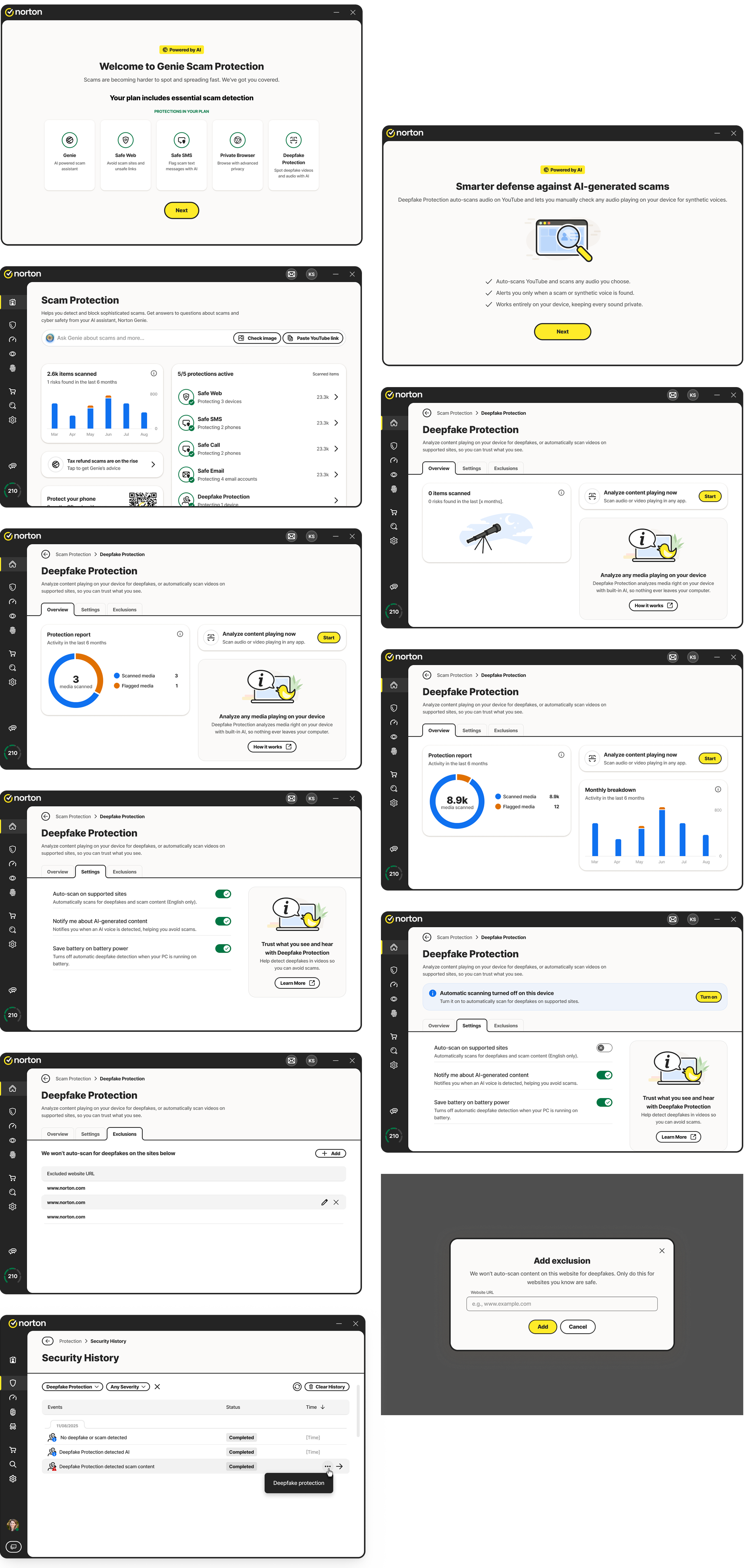
Scam Protection Windows experience: unified dashboard with Deepfake Protection integrated
The Scam Protection home screen now presents all protection types with a unified layout and clear visual hierarchy. Deepfake Protection appears as a fifth active module, using consistent status colours, typography, and component spacing.
The overview presents scanning summaries, trends, and clear actions like “Analyse content now.” A live scanning indicator reassures users that the feature is working silently in the background.
Users can customise how and when scanning occurs, with options like auto-scan, AI voice detection alerts, and battery-saving behaviour. The exclusions tab enables whitelisting specific sites.
Detection alerts feel immediate yet calm. Users see messages like “No deepfake detected”, “AI content detected”, or “Scam detected” with short summaries and links to learn more.
Detection results and manual scans are logged in the Security History panel, where users can review time, severity, app name, and media details with links back to Deepfake Protection.
Shared patterns for icons, tabs, and alerts ensure the experience feels unified across Windows, macOS, and mobile, even with multiple teams working on different platforms.
We tested four key user flows: onboarding, returning to the feature, deepfake detection during YouTube playback, and manual scanning. While most flows performed smoothly, the manual scan flow initially caused confusion. Since Deepfake Protection scans audio outside the Norton app, users were unsure whether the scan was analysing system audio or app-level media.

Scam Protection prototypes used during usability testing sessions
To address the confusion, we explored several iterations to improve clarity. We introduced a clear state indicator showing when an external scan was running, along with a subtle visual confirmation that the system audio was being analysed in real time. This update significantly improved user understanding and confidence, ensuring the manual scan felt both transparent and trustworthy.
Testing the ideal flow is straightforward - audio plays, AI analyses, result appears. But real-world usage broke assumptions we hadn’t questioned.
The biggest issue surfaced during manual scan testing. Deepfake Protection analyses system-level audio, not audio within the Norton app. When users triggered a manual scan, they expected the app itself to be doing the analysis. Instead, the scan was capturing audio from other apps - a YouTube video playing, a voice call running. Users didn’t understand why Norton was “listening to their other apps.”
This wasn’t a bug - it was a mental model mismatch. Users assumed app-level scanning; the system performed OS-level scanning. Without addressing this gap, the feature felt invasive rather than protective.
We iterated through several approaches before landing on the solution:
This edge case reinforced a principle I carry into every project: designing for the ideal flow isn’t enough. The moments where users get confused, where their mental model doesn’t match the system’s behavior - those are where trust is built or broken. Testing revealed this gap. Iteration closed it. But only because we tested with real users doing real tasks, not just clicking through a prototype.
Making complex AI detection understandable through human-friendly language and visual cues helped users trust the technology rather than fear it. Clear communication about what AI analyses, when it runs, and why content is flagged is essential.
Aligning Deepfake Protection with existing Scam Protection patterns allowed users to transfer their familiarity instantly, making adoption seamless and reducing the learning curve for a complex new feature.
Presenting essential information upfront while allowing users to drill down for technical details balanced simplicity with control, which is critical when dealing with AI-powered features that can feel opaque.
Designing with Windows, macOS, iOS, and Android in mind from the very start ensured a unified experience and prevented costly redesigns later in the development cycle.
Testing the manual scan flow revealed confusion about what was being analysed, a problem we would not have discovered without putting prototypes in front of real users.
The most advanced technology still needs thoughtful design to feel approachable, protective, and trustworthy for everyday users.
Deepfake Protection represents Norton’s move into a new era of AI-driven security. The challenge was to make something highly technical feel human and understandable. By focusing on transparency, consistency, and simplicity, we created a feature that helps users trust what they see and hear online while keeping the experience aligned with the familiar rhythm of Norton’s ecosystem.
This project stands as a foundation for future AI-powered protections that prioritise user clarity and confidence over complexity. As deepfake technology continues to evolve, so will the design, but the principles of trust, transparency, and simplicity will remain at its core.
Get in touch to discuss projects and opportunities.