Avira
Avira Security Suite Redesign
Windows Security Software
Windows Security Software
I led the product design of Avira's flagship and award-winning Windows security software solution called Avira Security Suite. The old product had poor usability, low conversion, and needed a total refresh. The goal was to create a product that is easy to use, perceived and loved by customers, and drives exceptional business results.
After the redesign, we achieved remarkable outcomes: +269% revenue, +163% orders, and +439% customer lifetime value. The product also helped reduce support calls and improve retention. This successful project opened doors for the company to adapt it across Mac and mobile platforms.

Current Avira Windows software dashboard
The redesign delivered exceptional business impact across all key metrics, transforming Avira from the least preferred security software to an award-winning solution.
During the initial research phase, we conducted the "Hamburg Test", an in-depth comparison study with 23 users from different backgrounds. We asked them to rate Avira and two competitors in Germany based on ease of use, findability, performance, and desirability. Users completed the same set of tasks across all three security products and rated them on key metrics.
The results were sobering. Avira received the most red cards for the product participants liked least. The product was perceived as outdated, hard to navigate, and confusing. Users described the interface as looking "20 years old" and struggled to find even basic features.
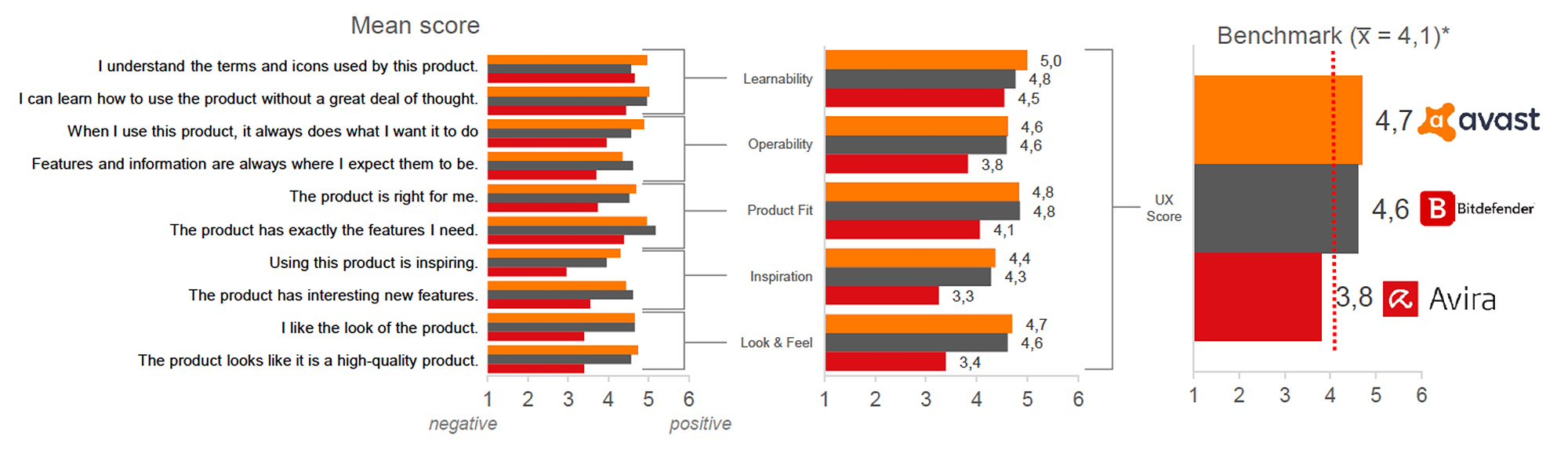
UX score of Avira compared to Avast and Bitdefender

Convenience of finding information rated against competitors
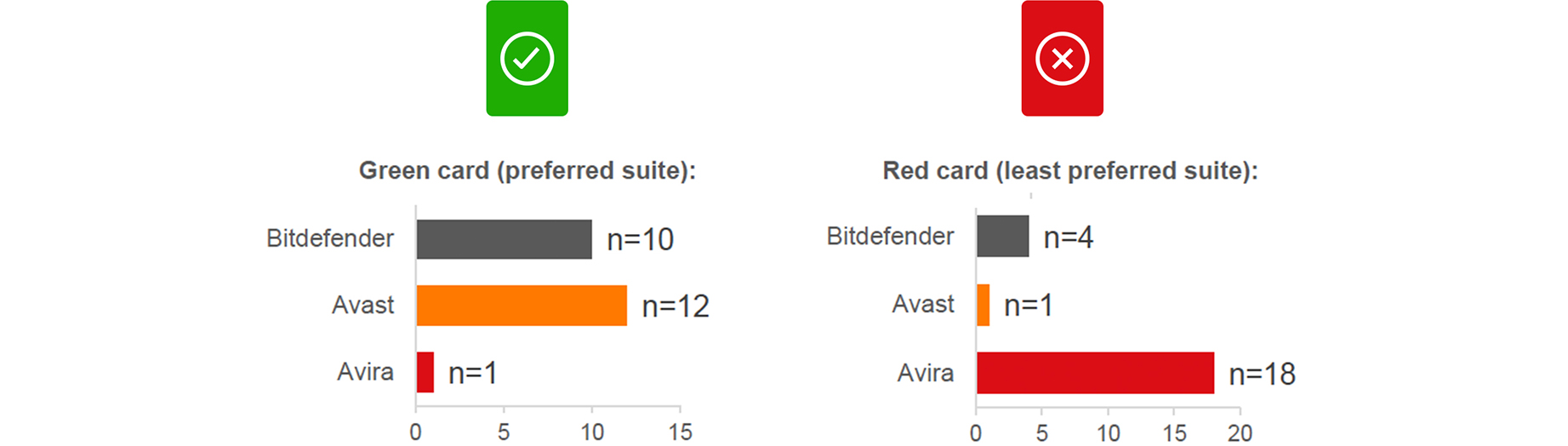
Avira received the most red cards from participants
It looks like 20 years ago & I had to look a lot to find what I am looking for. It was hard to get an overview and to navigate. For a long time I didn't even see that there is more, I didn't know you need to scroll the list. When you open one option you need to close it to get back. It is not all in one. Participant from the Hamburg user testing
The goal was to create a well-integrated product with focus on user needs: a highly aesthetic product design that is simple and intuitive to use. The solution we envisioned, codenamed "Spotlight," was built on the idea of putting the spotlight back on the users.
We addressed the issues surfaced in previous user tests while maintaining a larger vision: a product that brings users closer, presents itself as modern, lightweight, and easy to use, and benefits from Avira's already high-performing detection engine. The solution needed to be scalable across all platforms (Windows, macOS, iOS, Android) and provide a consistent user experience.
Avira is a 30+ year old security company trusted by over 500 million customers worldwide. We needed to ensure this new solution made sense for everyone, from loyal long-time users to new prospects.
We defined clear metrics to ensure the redesign achieved both business and user experience goals. We intended to apply learnings from this product toward Mac, iOS, and Android platforms.
Increase the number of conversions from Free to Paid subscribers.
Increase user engagement with the product features.
Perceived as more modern and contemporary software.
Users find the new solution very easy to use.
Better retain existing users and reduce churn.
Generate more revenue per paid user and increase customer lifetime value.
We ran design sprints based on GV's lean validation process (Google Design Sprint), a five-day process for answering critical business questions through design, prototyping, and testing ideas with customers. It brings together the "greatest hits" of business strategy, innovation, behavior science, and design thinking into a battle-tested framework.
Working together in a sprint, we compressed months of debate and development into a single week. Instead of waiting to launch a minimal product to understand if an idea was any good, we got clear data from a realistic prototype. The sprint gave us a superpower: we could fast-forward into the future to see our finished product and customer reactions before making expensive commitments.

Me with my team working in one of the many design sprints
The plan was to create an all-in-one Security Suite. I started with the data we had in hand, digging into Mixpanel analytics, analyzing all types of metrics, and sharing the problem context with the team. We had the user testing results to understand the user perspective of the product.
I also met with experts from across the industry and every department: Support, Virus Labs, Marketing, and stakeholders. This helped me understand the expert perspective on pain points and challenges with the current product.
Yes, a more thorough integration is more common, and may give a better impression. It's a matter of "an antivirus with many bonus features" versus "an antivirus that tries to get you to install other products." AV-Comparatives Expert
Customer support shared valuable insights helping us understand the top 5 features people had issues with. Licensing, findability issues, and unclear UX flows were the most pressing. The issues from user tests and support calls were very similar, confirming the problem from multiple angles. Marketing shared data showing the number of clicks needed to reach the upsell screen, a direct contributor to low conversions.
I analyzed all competitor products, sketched their features on sticky notes, and mapped them on the wall. This gave us a clear picture of which feature was available with which competitor and how it was presented.
I started sketching with the concept of an all-in-one scan, something beyond a traditional virus scan. This "Smart Scan" would reduce friction between multiple clicks to the upsell while showing users immediately that we can do more than just virus scanning. I also restructured the navigation around three pillars: Security, Privacy, and Performance.

Wall with all the initial sketches and ideas
I worked closely with the team to craft copy, distill key points, and brainstorm visualizations. To present the problem to stakeholders intuitively, I drew the current user steps and solutions, making problems in the user flow immediately visible.
Avira’s security suite isn’t a single tool - it’s a complex system of antivirus engines, VPN tunnels, password managers, and performance optimizers all running simultaneously. The core design challenge wasn’t making things look better. It was making a multi-process security system understandable at a glance.
Before touching any UI, I mapped out every possible state the system could be in. A user opening the app needed to immediately know: Am I protected right now? We defined five primary states that every screen needed to communicate clearly:
Nothing is actively scanning, but all shields are up. The default “everything is fine” state - users should feel calm, not anxious.
Active scan in progress. Users need to see progress, understand what’s being checked, and know they can continue using their device.
Something was found. The system needs to communicate severity, recommended action, and give the user agency - not just alarm them.
The system is actively fixing something or updating definitions. Users need to know work is happening without requiring their intervention.
Something requires user action - an expired license, a disabled shield, or a failed update. The UI must prioritize what to fix first.
In the old Avira, users had to navigate to separate modules to run different scans - virus scan, network check, privacy scan, performance check. Most users didn’t know which to run, so they ran none.
Smart Scan unified all of these into a single action. One button triggers a sequential check across security, privacy, and performance. The UI shows each phase progressing, gives real-time feedback, and surfaces only what matters: issues found, actions recommended. This wasn’t just a UI decision - it required aligning with the backend team on how to coordinate multiple scan engines into one coherent flow, with graceful handling when individual modules timed out or returned partial results.
After collecting feedback on sketches, ideas, and copy, I presented them in meetings with developers, product managers, and stakeholders to clarify technical constraints. This was an opportunity to discuss MVP priorities, longer vision, and backend architecture.
I created designs for the flows we wanted to validate, built prototypes with interactions, then user tested every sprint and documented feedback. This iterative approach allowed gradual, validated changes to both flow and design. See below how the dashboard evolved over time based on real user feedback.

Smart Scan running in Avira Security Suite

Sample iterations of the dashboard design

Smart Scan animation running in the suite
We also created a design system called "Umbrella", a collection of reusable components guided by clear standards. Umbrella eliminated guesswork, helping the product be created quickly and consistently. There were many iterations to find the right balance between a product that converts well and one that is enjoyable and easy to use.
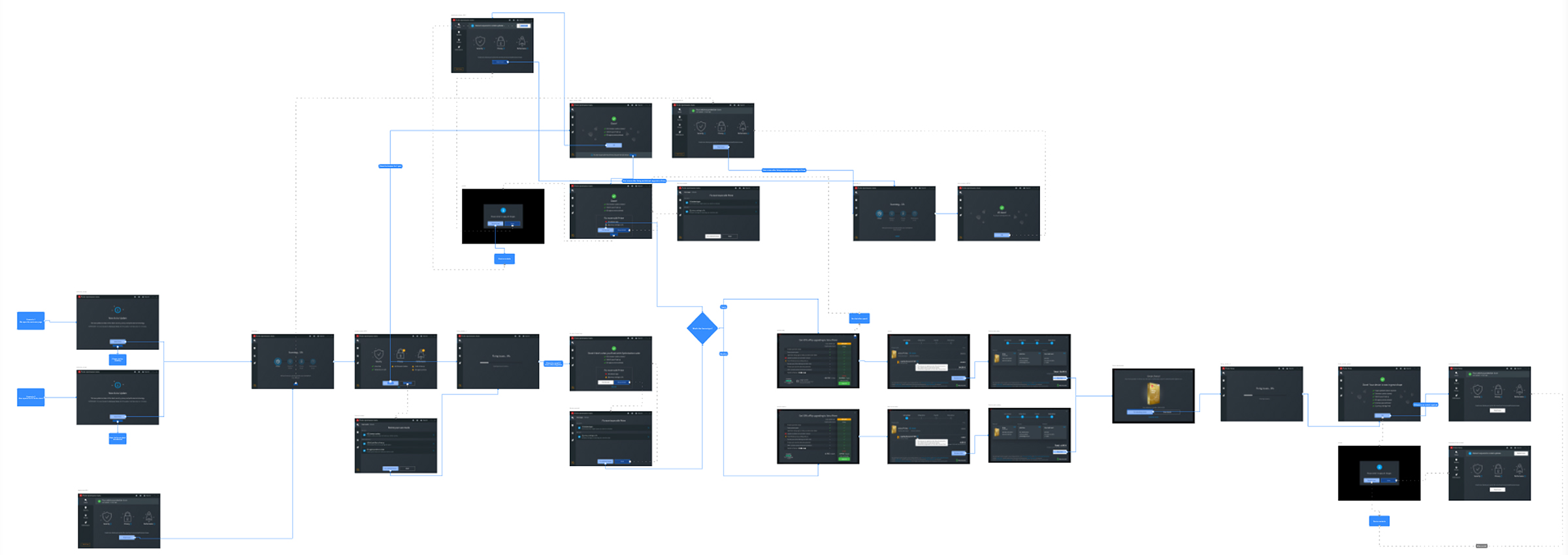
User flow of one of the features we user tested
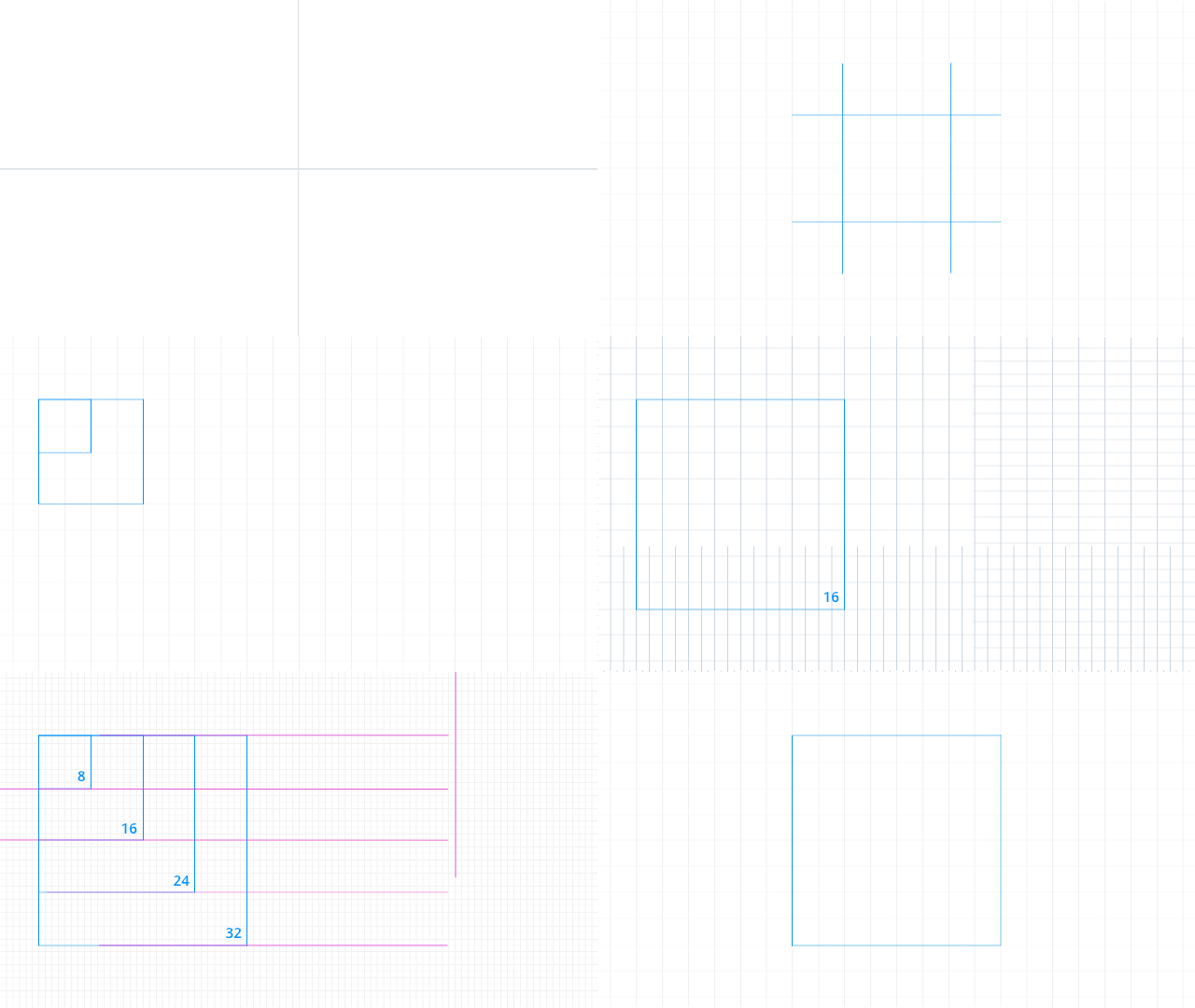
During the Avira redesign, I led the creation of Umbrella - a design system built on an 8pt grid with a 12-column layout, rem-based spacing, and platform-aware components for Windows, macOS, iOS, and Android. Umbrella unified Avira’s products around a common visual language: reusable components, a clear icon system, motion principles targeting 60fps, and built-in accessibility following WCAG guidelines.
It solved Avira’s problem. But when Gen Digital brought Norton, Avast, Avira, LifeLock, and AVG under one roof, the question changed: how do you serve five brands with one system, each with its own identity, across every platform?

Umbrella design system: reusable components across light and dark themes
Umbrella’s original implementation used hardcoded color values - Avira red applied directly to components. This worked for one brand. It broke the moment the same button needed to render in Norton yellow or Avast purple.
The evolution introduced a token-based architecture with two clear layers: primitive tokens (the raw palette - red-500, blue-700, neutral-100) and semantic tokens (what colors mean in context - color.action.primary, color.surface.danger, color.text.muted). Components only reference semantic tokens. A brand-specific configuration maps those tokens to each product’s visual identity.
This became a JSON-based theming system - a translation layer between shared components and each brand’s expression. A single theme file maps the full identity: primary action color, surface tones, corner radius, elevation, and typographic adjustments. Switching from Avira to Norton is a config swap, not a redesign.
Light and dark mode became a first-class feature - each brand ships with both theme variants derived from the same token set. For engineering, this meant one codebase rendering five branded products with predictable output. For design, it meant iterating on the system once and rolling improvements across all brands simultaneously.

Primitive color tokens, SCSS variables, and light/dark ratio mapping
Raw values - colors, spacing, type sizes. Brand-agnostic. The foundational palette everything builds on.
Contextual meaning -action.primary, surface.elevated, text.danger. Components reference these exclusively, never raw values.
JSON configuration files mapping semantic tokens to each brand’s identity. Same components, different expression - Norton, Avira, Avast, LifeLock, AVG.
At every stage of the project, I conducted extensive concept tests and usability tests. The solution and iterations were validated with users, from icons and terminology to accessibility and user flow for every feature. We needed to verify our hypotheses, which would determine the product strategy.
I preferred in-person user tests to meet users, present the solution, and ask them to complete tasks. Everyone watching took notes, tracking positive, negative, and neutral feedback for every interaction. We tracked reactions and confidence to validate proposals more rigorously.

Notes from one of the user testing sessions
For remote sessions, we shared screens and provided users with control. I designed test sessions and tasks, then observed whether users had difficulty completing them. This process helped us fix many issues in the product flow before they reached production.
Design decisions in a security product can’t be made in isolation from system logic. Scan durations vary, threat databases update in the background, VPN connections drop, and license states change server-side. Every UI state I designed had to map to a real backend condition - not an idealized happy path.
I worked directly with developers to understand actual system constraints: which scan modules could run in parallel, how long threat resolution typically took, what happened when a user went offline mid-scan, and how license verification synced across modules. This shaped decisions like showing estimated time remaining only when the backend could reliably calculate it, and using a loading state without a percentage when it couldn’t.
Complex visual designs mean nothing if they can’t be built efficiently. I simplified component specifications to reduce engineering effort without compromising the experience: consolidating similar alert types into a single configurable component, reducing animation keyframes to what the rendering engine could handle at 60fps, and defining clear prop interfaces so developers could implement components without ambiguity.
Rather than shipping a complete redesign at once, we structured the rollout across seven iterative MVPs (MVP1 through MVP7). Each release isolated a specific set of changes - dashboard layout, Smart Scan flow, settings architecture - and was A/B tested against the existing product. This let us validate incrementally: measure real conversion impact, catch regressions early, and adjust course based on data rather than assumptions. Engineering and design reviewed each release together before the next MVP scope was defined.
After many iterations and rounds of feedback, the design reached a stage where we could qualitatively confirm the solution was working. We had found a strong conversion mechanism with Smart Scan. Qualitatively, we had achieved key project goals:
To our surprise, some users wanted to buy the application immediately, without realizing it was a prototype. This gave us a big thumbs up that the solution was working.
Even with qualitative success, we still needed to quantitatively validate with real users. We were dealing with millions of paying customers, so nothing could be left to chance. The MVP was released in beta to a few million new Avira users, compared against a control group receiving the standard package.
We split the MVP into multiple stages for more focused A/B testing (sometimes ABCD testing). From MVP1 to MVP7, we tested many variants with targeted changes that improved both conversion and experience.

Comparison chart with revenue, orders, and CLV improvements
Continuous user testing and iteration transformed Avira from receiving the most red cards in Hamburg testing to winning the Best Usability Award. Putting users at the center of every decision was the foundation of success.
Design directly drove massive business growth: 163% increase in orders, 269% revenue growth, and 439% CLV improvement. UX excellence translates directly to bottom-line results when executed with rigor.
The Smart Scan innovation addressed both user confusion and conversion challenges simultaneously. By creating an all-in-one scan that showcases value beyond antivirus, we solved multiple problems with one feature.
The Umbrella design system created reusable components that ensured rapid, consistent development across Windows, Mac, iOS, and Android platforms, serving as a multiplier for the entire organization.
Qualitative success must be backed by quantitative proof. From MVP1 to MVP7, rigorous A/B testing with millions of real users gave us the confidence to scale globally.
This project demonstrates how thorough user research, iterative design sprints, and data-driven validation can transform a legacy product into a modern, user-friendly solution that delights users and drives exceptional business results.
The journey from worst UX ratings to the Best Usability Award validates the power of putting users at the center of design decisions. Not only did we achieve our quantitative goals, with orders up 163%, revenue up 269%, and customer lifetime value up 439%, but we also established a design foundation scalable across all platforms.
User experience design is a never-ending process. After launch, we continued gathering feedback, ran the Hamburg Test 2.0 comparison study, and found Avira now led in ease of use, understandability, and most attractive design. The work continues as we identify new opportunities to make the product even more valuable, innovative, and indispensable to our users.
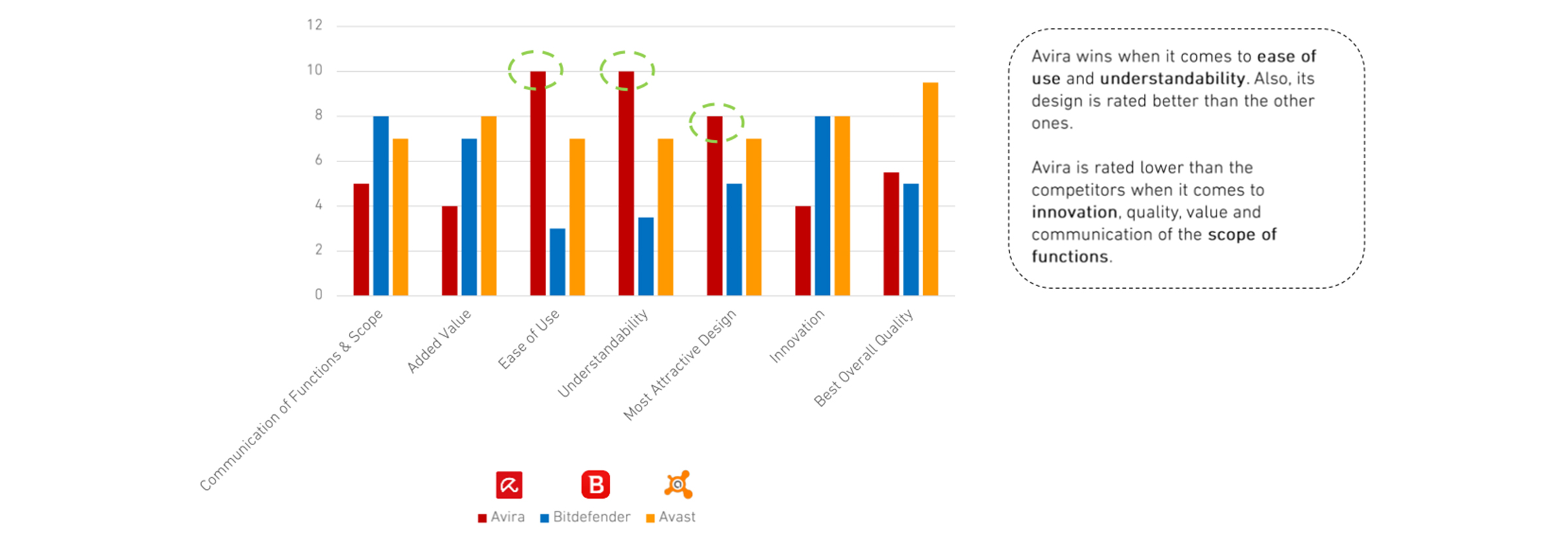
Recommendation and reuse scores post-redesign

System acceptance scores in Hamburg Test 2.0
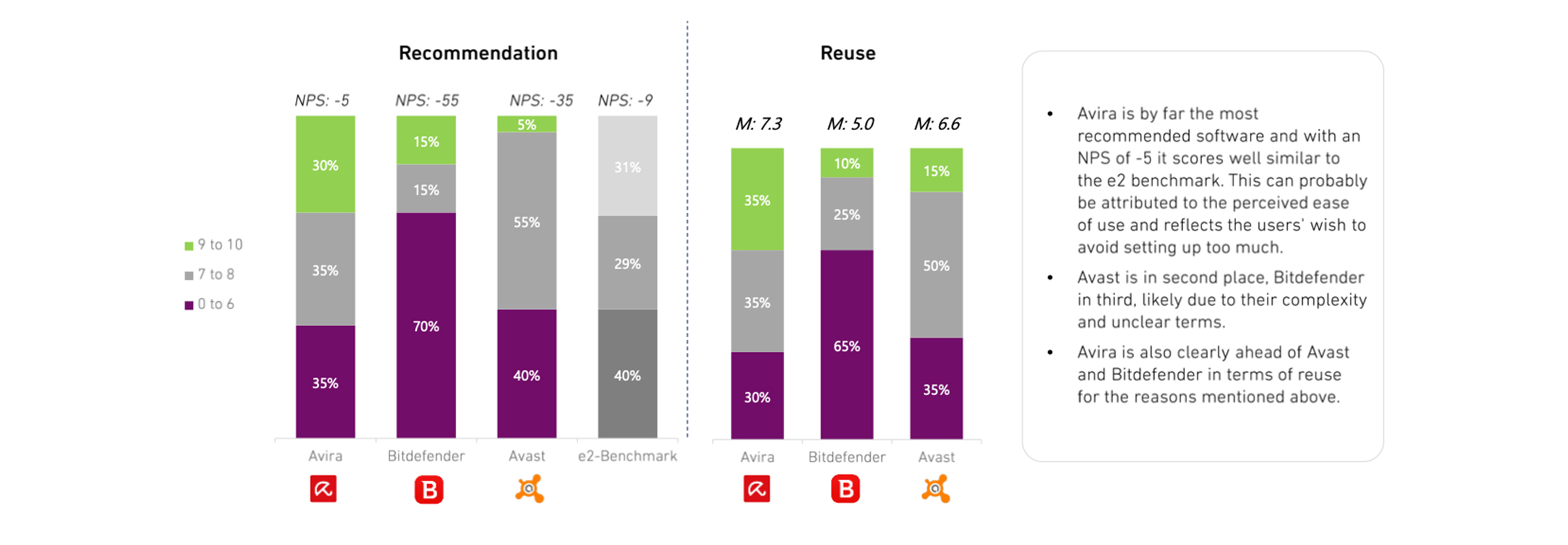
Summarizing the comparison from Hamburg Test 2.0
Get in touch to discuss projects.